Send and Update Product Unit of Measures (UOM) Details
Aptean Process Manufacturing OEE
•
Article
•
5/29/2024
•
You can send and update the Product UOM to the APMOEE portal manually or through Job Queue.
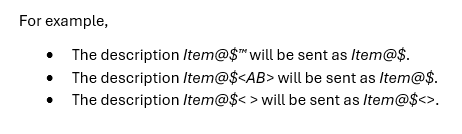
The system allows special characters in the description of Units of Measure when sending product details to the APMOEE portal. However, the non-ASCII special characters, such as trademark symbols, will be excluded from the description when sent to the APMOEE portal. Additionally, any text enclosed between the less than (<) and greater than (>) symbols will be excluded along with the symbols. If these symbols appear without any text between them, they will be included in the description.
Prerequisites
Prior to send and update Product UOM details, you must have an APMOEE Admin role assigned. Also you must create Product UOM in Business Central.